> ## Documentation Index
> Fetch the complete documentation index at: https://docs.business.blaaiz.com/llms.txt
> Use this file to discover all available pages before exploring further.
# API integration
> Common questions about integrating with the Blaaiz API
## Where do I find my OAuth credentials and webhook settings?
Navigate to the **top-right avatar** dropdown and select **"API & Webhooks"**.
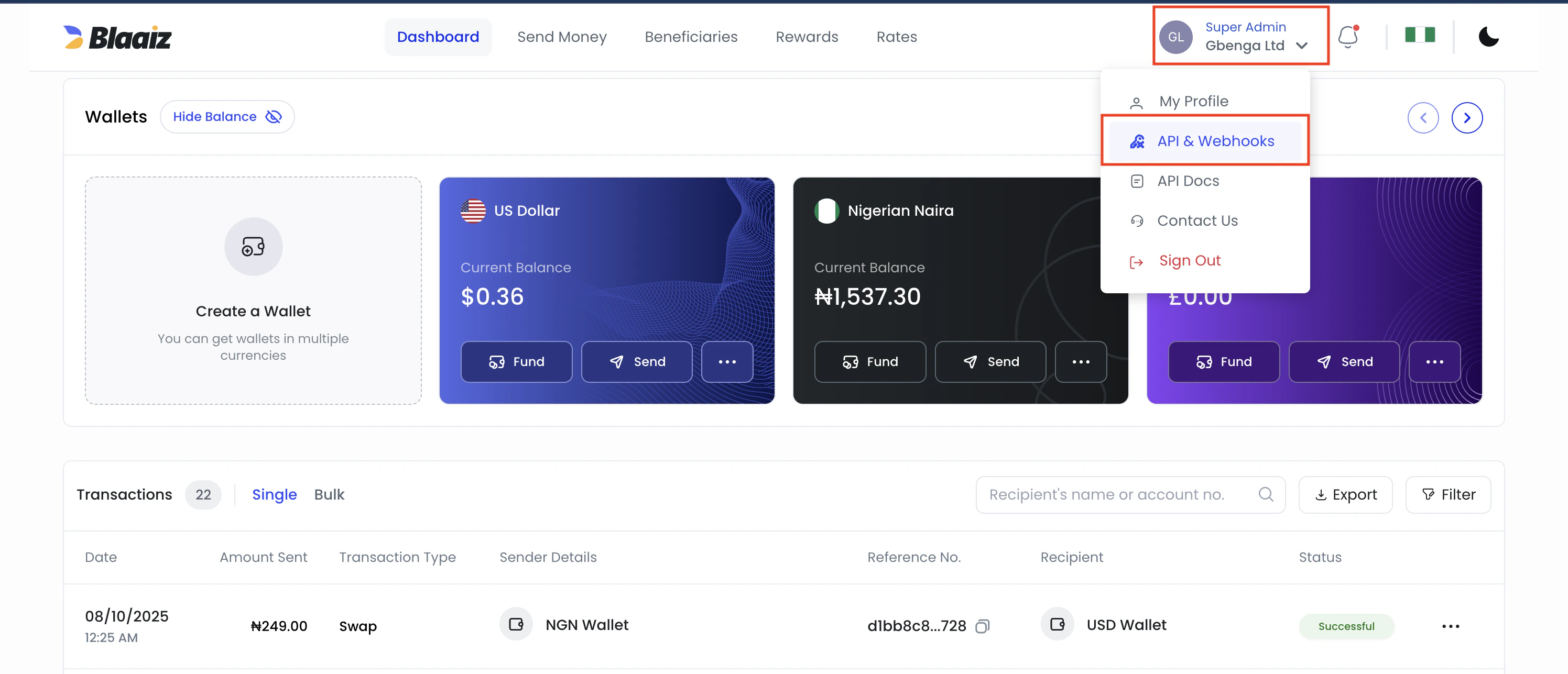 From there, you can manage your OAuth credentials, configure webhook URLs, rotate your webhook signing secret, and view webhook logs.
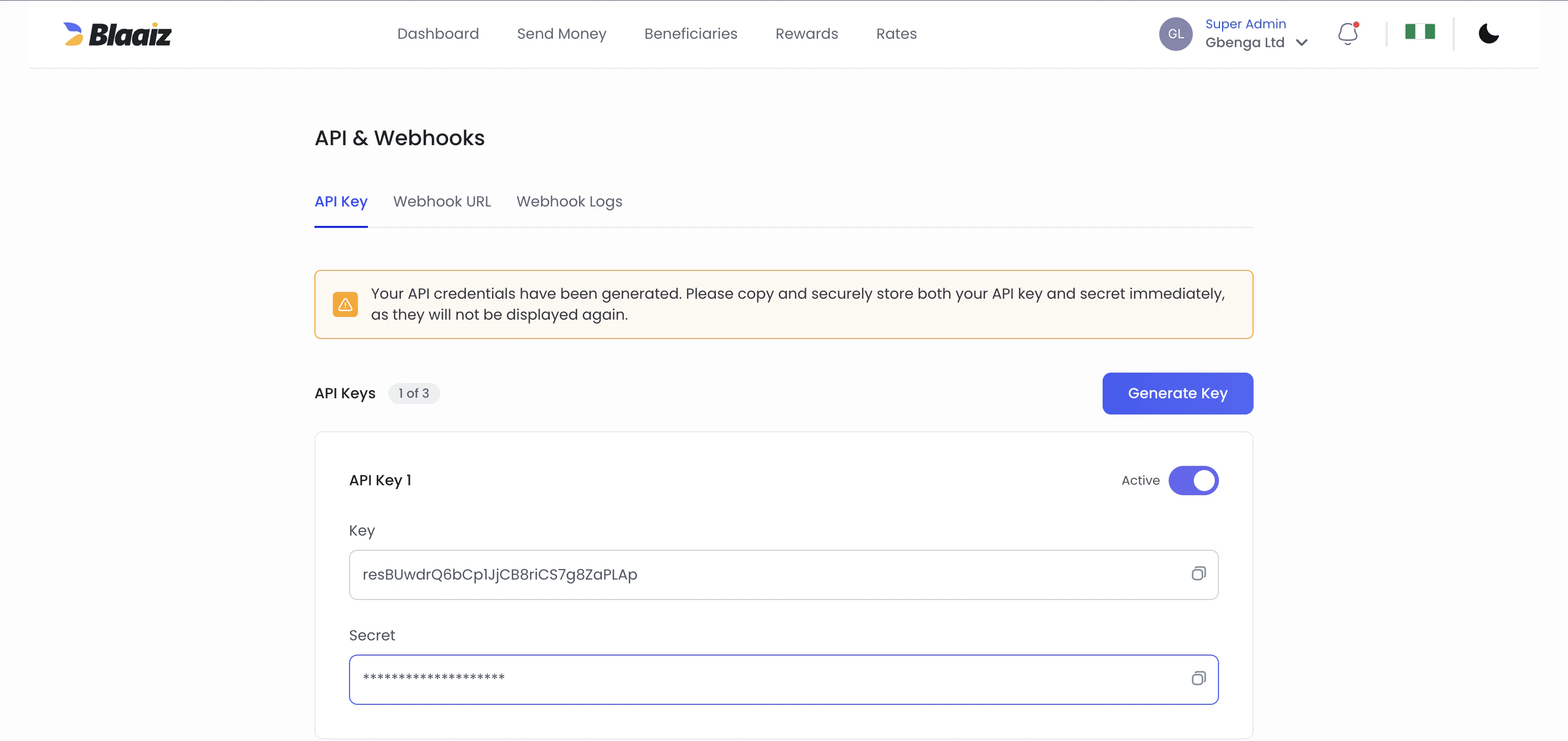 OAuth credentials are environment-specific. For the dev environment, create a separate account at [business-dev.blaaiz.com](https://business-dev.blaaiz.com) — credentials generated there will not work in production and vice versa.
Creation of new legacy API keys is disabled. If you still have an older API-key-based integration, switch fully to OAuth as soon as possible.
Older integrations may still send:
```http theme={null}
x-blaaiz-api-key: YOUR_LEGACY_API_KEY
```
Treat that as legacy only. New integrations should request an OAuth access token and call the API with `Authorization: Bearer `.
## Which secret should I use for what?
* Use the OAuth `client_secret` only when requesting an access token from `/oauth/token`.
* Use the webhook `signing_secret` only when verifying the `x-blaaiz-signature` header on webhook deliveries.
Do not use your OAuth `client_secret` to verify webhooks.
Both secrets should be treated as one-time-visible values. Store them securely when they are shown. If either secret is lost later, rotate it from **API & Webhooks** and update your integration.
## Which scopes should I request?
When requesting an access token from `/oauth/token`, pass the scopes that were assigned to your OAuth credentials. For example: `scope=wallet:read payout:create transaction:read`.
Each endpoint requires a specific scope (e.g. `payout:create` for payouts, `wallet:read` for wallets). If your token lacks the required scope, you will receive a `403 Forbidden` response. See [Authentication — Scopes](/guides/authentication#scopes) for the full list of scopes and bundles.
## What are the required parameters for the collection API?
The collection API requires the following parameters:
* `method` - The collection method (e.g., `"card"`, `"bank_transfer"`)
* `amount` - The total amount including all applicable fees
* `customer_id` - The unique identifier created via the Customer API. The customer must be `VERIFIED` — for `type=individual` via the legacy KYC flow, for `type=business` via the [KYB flow](/guides/kyb/overview).
* `wallet_id` - Your business wallet ID for the specific currency
* `phone_number` - Required for certain collection methods
Always consult the API documentation for the specific requirements of each collection method, as they may vary.
## How do I onboard a `type=business` customer?
Business customers go through a different flow from individual customers. They require beneficial owners and a KYB document collection (incorporation certificate, etc.), and they use a different set of upload endpoints. The legacy `/files` endpoint and `id_file` trigger do not apply to business customers.
See [Business customer KYB](/guides/kyb/overview) for the full lifecycle and [Onboarding a business customer](/guides/kyb/onboarding) for the step-by-step.
## Do we need to implement all collection methods?
No, you only need to implement the collection methods that correspond to your supported currencies.
For example:
* If your business only handles CAD and NGN transactions, you only need the collection methods relevant to those currencies, such as Interac, virtual bank accounts, or card collections
* You can choose to implement only the specific collection methods that align with your business needs and supported currencies
## What is IP whitelisting and why is it required?
IP whitelisting is a security requirement where merchants must submit their server IP addresses during onboarding. Only API requests from whitelisted IP addresses will be accepted—requests from non-whitelisted IPs will be rejected.
To whitelist your IP addresses:
1. Identify all IP addresses that will make API calls
2. Submit them to [support@blaaiz.com](mailto:support@blaaiz.com) during onboarding
3. Contact support if you need to add or update IPs after onboarding
For more details, see the [IP whitelisting guide](/guides/ip-whitelisting).
OAuth credentials are environment-specific. For the dev environment, create a separate account at [business-dev.blaaiz.com](https://business-dev.blaaiz.com) — credentials generated there will not work in production and vice versa.
Creation of new legacy API keys is disabled. If you still have an older API-key-based integration, switch fully to OAuth as soon as possible.
Older integrations may still send:
```http theme={null}
x-blaaiz-api-key: YOUR_LEGACY_API_KEY
```
Treat that as legacy only. New integrations should request an OAuth access token and call the API with `Authorization: Bearer `.
## Which secret should I use for what?
* Use the OAuth `client_secret` only when requesting an access token from `/oauth/token`.
* Use the webhook `signing_secret` only when verifying the `x-blaaiz-signature` header on webhook deliveries.
Do not use your OAuth `client_secret` to verify webhooks.
Both secrets should be treated as one-time-visible values. Store them securely when they are shown. If either secret is lost later, rotate it from **API & Webhooks** and update your integration.
## Which scopes should I request?
When requesting an access token from `/oauth/token`, pass the scopes that were assigned to your OAuth credentials. For example: `scope=wallet:read payout:create transaction:read`.
Each endpoint requires a specific scope (e.g. `payout:create` for payouts, `wallet:read` for wallets). If your token lacks the required scope, you will receive a `403 Forbidden` response. See [Authentication — Scopes](/guides/authentication#scopes) for the full list of scopes and bundles.
## What are the required parameters for the collection API?
The collection API requires the following parameters:
* `method` - The collection method (e.g., `"card"`, `"bank_transfer"`)
* `amount` - The total amount including all applicable fees
* `customer_id` - The unique identifier created via the Customer API. The customer must be `VERIFIED` — for `type=individual` via the legacy KYC flow, for `type=business` via the [KYB flow](/guides/kyb/overview).
* `wallet_id` - Your business wallet ID for the specific currency
* `phone_number` - Required for certain collection methods
Always consult the API documentation for the specific requirements of each collection method, as they may vary.
## How do I onboard a `type=business` customer?
Business customers go through a different flow from individual customers. They require beneficial owners and a KYB document collection (incorporation certificate, etc.), and they use a different set of upload endpoints. The legacy `/files` endpoint and `id_file` trigger do not apply to business customers.
See [Business customer KYB](/guides/kyb/overview) for the full lifecycle and [Onboarding a business customer](/guides/kyb/onboarding) for the step-by-step.
## Do we need to implement all collection methods?
No, you only need to implement the collection methods that correspond to your supported currencies.
For example:
* If your business only handles CAD and NGN transactions, you only need the collection methods relevant to those currencies, such as Interac, virtual bank accounts, or card collections
* You can choose to implement only the specific collection methods that align with your business needs and supported currencies
## What is IP whitelisting and why is it required?
IP whitelisting is a security requirement where merchants must submit their server IP addresses during onboarding. Only API requests from whitelisted IP addresses will be accepted—requests from non-whitelisted IPs will be rejected.
To whitelist your IP addresses:
1. Identify all IP addresses that will make API calls
2. Submit them to [support@blaaiz.com](mailto:support@blaaiz.com) during onboarding
3. Contact support if you need to add or update IPs after onboarding
For more details, see the [IP whitelisting guide](/guides/ip-whitelisting).