> ## Documentation Index
> Fetch the complete documentation index at: https://docs.business.blaaiz.com/llms.txt
> Use this file to discover all available pages before exploring further.
# Interac Money Requests
> Learn how Interac money requests work on Blaaiz and how to pull CAD collections by requesting funds from a payer.
## Overview
Alongside [Interac Auto Deposits](/guides/interac-auto-deposits), Blaaiz supports **Interac money requests** for collecting **Canadian Dollars (CAD)**.
Where Auto Deposit is a **push** flow — your customer sends an e-Transfer to your email and Blaaiz credits you — a money request is the **pull** counterpart. Your platform asks Blaaiz to send an Interac money request to a payer, the payer approves it from their banking app, and the funds land in your CAD wallet.
Interac money requests are available **exclusively for CAD collections**.
***
## What is an Interac money request?
An **Interac money request** is a request for payment sent to someone's email address. Instead of waiting for the payer to remember to send funds, you initiate the collection:
1. You tell Blaaiz the **amount** and the **payer's email**.
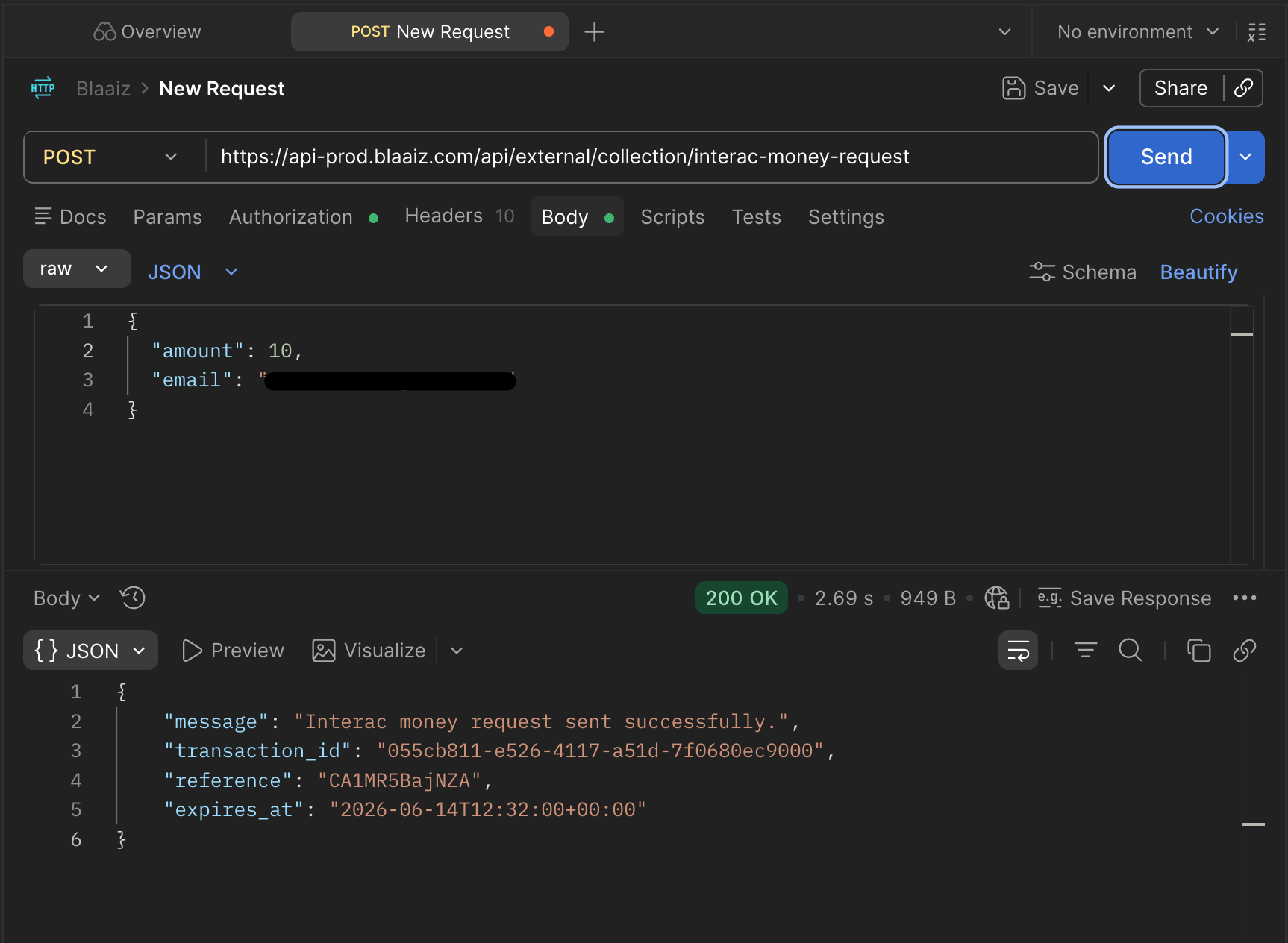 2. Blaaiz sends an Interac money request to that email.
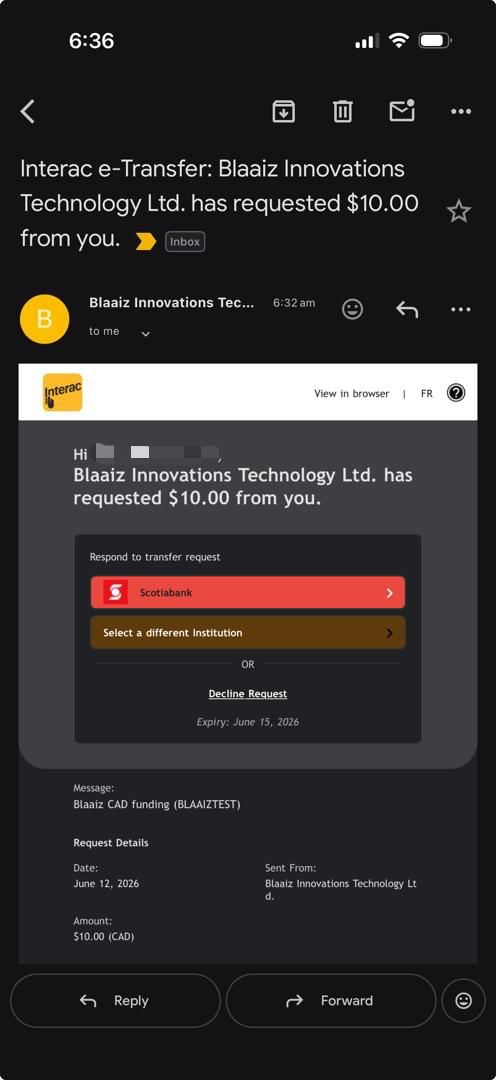 3. The payer opens their banking app and **approves** the request.
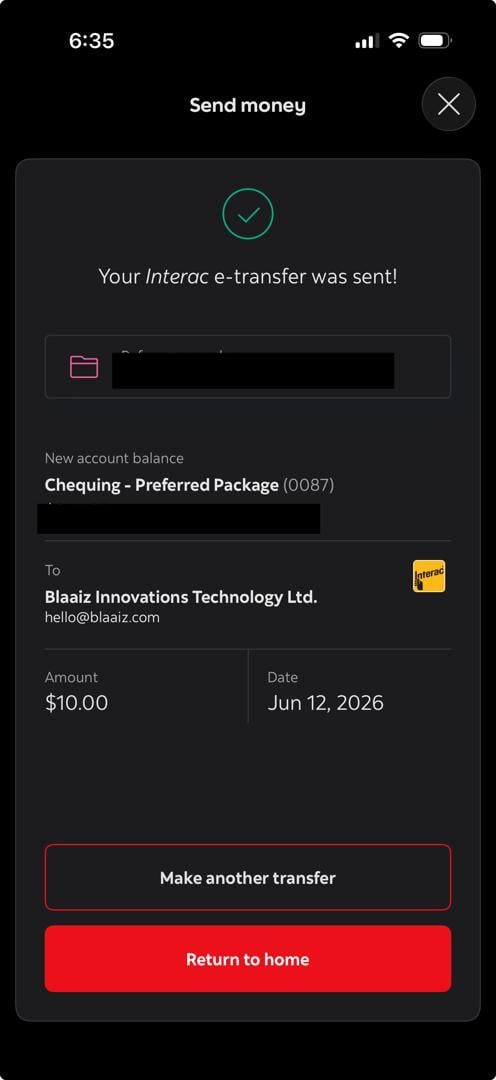 4. The funds are sent and Blaaiz credits your CAD wallet.
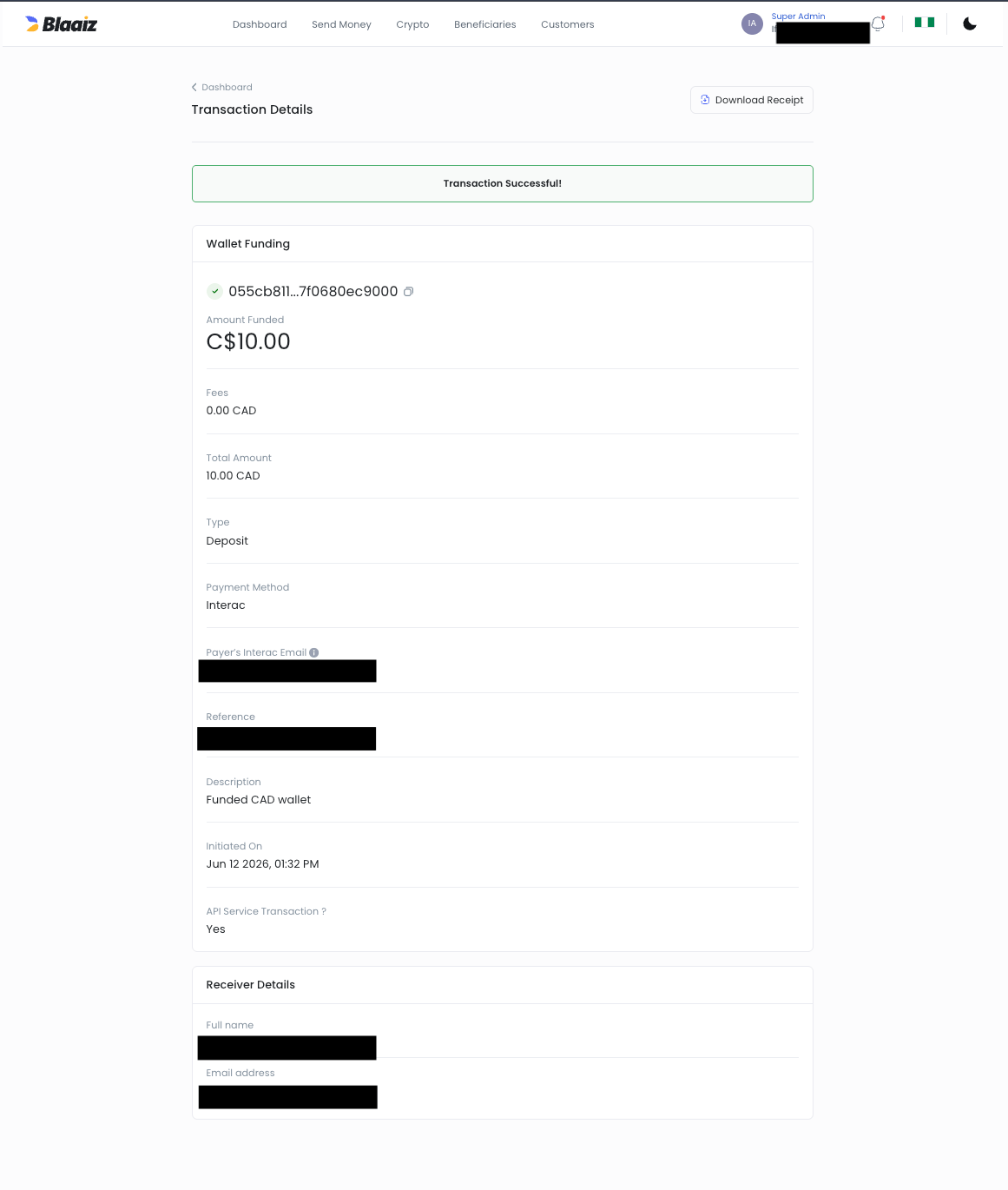 This is ideal when you know exactly how much to collect and from whom — invoicing, on-demand top-ups, or any flow where you'd rather initiate the collection than display an email and hope the customer sends the right amount.
***
## Push vs pull: Auto Deposit vs money request
| | Money request (pull) | Auto Deposit (push) |
| --------------- | -------------------------------------------------- | ----------------------------------- |
| Who starts it | Your platform | Your customer |
| Email you use | The **payer's** email | Your own branded Auto Deposit email |
| Customer action | Approve a request in their bank app | Send an e-Transfer to your email |
| Best for | Invoicing / on-demand requests with a known amount | Open-ended inbound payments |
| Setup required | Interac enabled + active CAD wallet | An active Auto Deposit email |
Both rails credit the same CAD wallet and emit the same [CAD collection webhook](/guides/webhooks/collection/cad).
***
## How Blaaiz supports Interac money requests
Blaaiz enables platform and merchant businesses to:
* **Initiate** a money request to any payer email
* **Receive** CAD funds directly into their CAD wallet once the payer approves
* **Track** the outcome via collection webhooks
### Example scenario
Let's say:
* **Company:** Envelopy
* **Business Type:** Platform business on Blaaiz
Envelopy invoices a customer, `payer@example.com`, for **100 CAD**. Instead of emailing an Auto Deposit address and waiting, Envelopy initiates a money request for that exact amount. The payer receives an Interac notification, approves it in their bank app, and the **net amount** lands in Envelopy's CAD wallet — confirmed by a collection webhook.
***
## Lifecycle
A money request settles **asynchronously**. Initiating it does not move money — it only sends the request.
```mermaid theme={null}
flowchart LR
You -->|Initiate request| Blaaiz
Blaaiz -->|Send money request| Interac
Interac -->|Notify| Payer
Payer -->|Approve in bank app| Interac
Interac -->|Funds| Blaaiz
Blaaiz -->|Credit CAD wallet + webhook| You
```
The collection stays **`PENDING`** from the moment you initiate it until the payer approves. You learn the final outcome from the collection webhook — never treat the initiation response as settlement.
| State | Meaning |
| ------------ | -------------------------------------------------------------- |
| `PENDING` | Request sent to the payer; awaiting their approval |
| `SUCCESSFUL` | Payer approved; your CAD wallet has been credited (net of fee) |
| Expired | Payer didn't approve before `expires_at`; no funds move |
### Expiry
A money request expires if the payer doesn't approve it in time. By default the request is valid for **48 hours**; you can shorten or extend this when initiating it, up to a maximum of **120 hours**. Once expired, no funds move and no success webhook is sent.
***
## Fees
The standard **INTERAC collection fee** applies — the same as Auto Deposit collections. Your wallet is credited the **net** amount; the webhook reports both the fee (`transaction_fee`) and the net (`transaction_amount_without_fee`).
***
## Identifying who paid
Like Auto Deposit, every CAD collection webhook includes a `source_information` object containing the payer's Interac email. Match the webhook to the collection you initiated using the `transaction_reference` (the reference returned when you initiated the request) or the `transaction_id`.
👉 See the full webhook payload here:
**[CAD Collection Webhook Sample](/guides/webhooks/collection/cad)**
***
## Integrating via the API
This page covers the concept. For the end-to-end API integration — request fields, sample requests and responses, and handling the webhook — see:
* **[Interac money requests use case](/guides/use-cases/interac-money-requests)**
* **[Initiate Interac money request](/api-reference/collection/initiate-interac)** (API reference)
* **[Authentication & scopes](/guides/authentication)** — requires the `collection:interac:create` scope
This is ideal when you know exactly how much to collect and from whom — invoicing, on-demand top-ups, or any flow where you'd rather initiate the collection than display an email and hope the customer sends the right amount.
***
## Push vs pull: Auto Deposit vs money request
| | Money request (pull) | Auto Deposit (push) |
| --------------- | -------------------------------------------------- | ----------------------------------- |
| Who starts it | Your platform | Your customer |
| Email you use | The **payer's** email | Your own branded Auto Deposit email |
| Customer action | Approve a request in their bank app | Send an e-Transfer to your email |
| Best for | Invoicing / on-demand requests with a known amount | Open-ended inbound payments |
| Setup required | Interac enabled + active CAD wallet | An active Auto Deposit email |
Both rails credit the same CAD wallet and emit the same [CAD collection webhook](/guides/webhooks/collection/cad).
***
## How Blaaiz supports Interac money requests
Blaaiz enables platform and merchant businesses to:
* **Initiate** a money request to any payer email
* **Receive** CAD funds directly into their CAD wallet once the payer approves
* **Track** the outcome via collection webhooks
### Example scenario
Let's say:
* **Company:** Envelopy
* **Business Type:** Platform business on Blaaiz
Envelopy invoices a customer, `payer@example.com`, for **100 CAD**. Instead of emailing an Auto Deposit address and waiting, Envelopy initiates a money request for that exact amount. The payer receives an Interac notification, approves it in their bank app, and the **net amount** lands in Envelopy's CAD wallet — confirmed by a collection webhook.
***
## Lifecycle
A money request settles **asynchronously**. Initiating it does not move money — it only sends the request.
```mermaid theme={null}
flowchart LR
You -->|Initiate request| Blaaiz
Blaaiz -->|Send money request| Interac
Interac -->|Notify| Payer
Payer -->|Approve in bank app| Interac
Interac -->|Funds| Blaaiz
Blaaiz -->|Credit CAD wallet + webhook| You
```
The collection stays **`PENDING`** from the moment you initiate it until the payer approves. You learn the final outcome from the collection webhook — never treat the initiation response as settlement.
| State | Meaning |
| ------------ | -------------------------------------------------------------- |
| `PENDING` | Request sent to the payer; awaiting their approval |
| `SUCCESSFUL` | Payer approved; your CAD wallet has been credited (net of fee) |
| Expired | Payer didn't approve before `expires_at`; no funds move |
### Expiry
A money request expires if the payer doesn't approve it in time. By default the request is valid for **48 hours**; you can shorten or extend this when initiating it, up to a maximum of **120 hours**. Once expired, no funds move and no success webhook is sent.
***
## Fees
The standard **INTERAC collection fee** applies — the same as Auto Deposit collections. Your wallet is credited the **net** amount; the webhook reports both the fee (`transaction_fee`) and the net (`transaction_amount_without_fee`).
***
## Identifying who paid
Like Auto Deposit, every CAD collection webhook includes a `source_information` object containing the payer's Interac email. Match the webhook to the collection you initiated using the `transaction_reference` (the reference returned when you initiated the request) or the `transaction_id`.
👉 See the full webhook payload here:
**[CAD Collection Webhook Sample](/guides/webhooks/collection/cad)**
***
## Integrating via the API
This page covers the concept. For the end-to-end API integration — request fields, sample requests and responses, and handling the webhook — see:
* **[Interac money requests use case](/guides/use-cases/interac-money-requests)**
* **[Initiate Interac money request](/api-reference/collection/initiate-interac)** (API reference)
* **[Authentication & scopes](/guides/authentication)** — requires the `collection:interac:create` scope